
Argo Rollout Experiment 실습
Argo experiment
아래 공식 문서를 보면서 공부하도록 한다.
링크
argo rollout experiment를 사용하면 사용자는 하나 이상의 Replicaset을 임시로 실행할 수 있습니다. (이와 함께 AnalysisRun 도 실행할 수 있다.)
각각 하나의 복제본을 가지는 두개의 Replicaset을 생성하고 두 복제본이 모두 사용 가능해지면 20분 동안 실험을 실행하는 예제 입니다.
분석을 하기 위해서 AnalysusRun이 실행됩니다.
apiVersion: argoproj.io/v1alpha1
kind: Experiment
metadata:
  name: example-experiment
spec:
  # Duration of the experiment, beginning from when all ReplicaSets became healthy (optional)
  # If omitted, will run indefinitely until terminated, or until all analyses which were marked
  # `requiredForCompletion` have completed.
  duration: 20m

  # Deadline in seconds in which a ReplicaSet should make progress towards becoming available.
  # If exceeded, the Experiment will fail.
  progressDeadlineSeconds: 30

  # List of pod template specs to run in the experiment as ReplicaSets
  templates:
  - name: purple
    # Number of replicas to run (optional). If omitted, will run a single replica
    replicas: 1
    # Flag to create Service for this Experiment (optional)
    # If omitted, a Service won't be created.
    service:
      # Name of the Service (optional). If omitted, service: {} would also be acceptable.
      name: service-name
    selector:
      matchLabels:
        app: canary-demo
        color: purple
    template:
      metadata:
        labels:
          app: canary-demo
          color: purple
      spec:
        containers:
        - name: rollouts-demo
          image: argoproj/rollouts-demo:purple
          imagePullPolicy: Always
          ports:
          - name: http
            containerPort: 8080
            protocol: TCP
  - name: orange
    replicas: 1
    minReadySeconds: 10
    selector:
      matchLabels:
        app: canary-demo
        color: orange
    template:
      metadata:
        labels:
          app: canary-demo
          color: orange
      spec:
        containers:
        - name: rollouts-demo
          image: argoproj/rollouts-demo:orange
          imagePullPolicy: Always
          ports:
          - name: http
            containerPort: 8080
            protocol: TCP

  # List of AnalysisTemplate references to perform during the experiment
  analyses:
  - name: purple
    templateName: http-benchmark
    args:
    - name: host
      value: purple
  - name: orange
    templateName: http-benchmark
    args:
    - name: host
      value: orange
  - name: compare-results
    templateName: compare
    # If requiredForCompletion is true for an analysis reference, the Experiment will not complete
    # until this analysis has completed.
    requiredForCompletion: true
    args:
    - name: host
      value: purple
위의 코드를 보면 people 와 orange 라는 deplotment, service를 생성하고 각각의 replicas가 실행될 때까지 progressDeadlineSeconds 많큼 기다린다.
이후 해당 시간 내 기동이 완료 되면 다음 실험으로 테스트를 진행한다. 실험은 duration 기간 동안만 진행된다.
중간에 Analysis 가 실패하는 경우에는 바로 실험은 종료된다.
requiredForCompletion:true 옵션을 주는 경우 실험이 제한시간이 지나더라도 완료될 때까지 대기하게 된다.
마찬가지로 duration이 없는 경우에도 모든 실험이 종료될 때까지 대기하게 된다.
실험이 완료되면 ReplicaSets은 0으로 축소되고 완료되지 않은 AnalysisRun은 종료된다.
ReplicaSet 이름은 실험 이름과 템플릿 이름을 결합하여 생성됩니다.
롤아웃과 통합
apiVersion: argoproj.io/v1alpha1
kind: Rollout
metadata:
  name: guestbook
  labels:
    app: guestbook
spec:
...
  strategy:
    canary:
      steps:
      - experiment:
          duration: 1h
          templates:
          - name: baseline
            specRef: stable
          - name: canary
            specRef: canary
          analyses:
          - name : mann-whitney
            templateName: mann-whitney
            args:
            - name: baseline-hash
              value: ""
            - name: canary-hash
              value: ""
트래픽 라우팅을 통한 가중치 실험 (weight 없이도 실험이 된다.)
apiVersion: argoproj.io/v1alpha1
kind: Rollout
metadata:
  name: guestbook
  labels:
    app: guestbook
spec:
...
strategy:
  canary:
    trafficRouting:
      alb:
        ingress: ingress
        ...
    steps:
      - experiment:
          duration: 1h
          templates:
            - name: experiment-baseline
              specRef: stable
              weight: 5
            - name: experiment-canary
              specRef: canary
              weight: 5
테스트
http-benchmark.yaml
# http-benchmark.yaml
apiVersion: argoproj.io/v1alpha1
kind: AnalysisTemplate
metadata:
  name: http-benchmark
spec:
  args:
    - name: host
      value: ""
  metrics:
    - name: success-rate
      interval: 30s
      successCondition: result > 0.9
      provider:
        job:
          spec:
            template:
              spec:
                containers:
                  - name: benchmark
                    image: curlimages/curl
                    command: [ "sh", "-c" ]
                    args:
                      - |
                        result=$(curl -s -o /dev/null -w "%{http_code}" http://:8080);
                        if [ "$result" = "200" ]; then exit 0; else exit 1; fi;
                restartPolicy: Never
rollout-experiment
# rollout-experiment.yaml
apiVersion: argoproj.io/v1alpha1
kind: Rollout
metadata:
  name: demo-rollout
spec:
  replicas: 2
  selector:
    matchLabels:
      app: demo
  template:
    metadata:
      labels:
        app: demo
    spec:
      containers:
        - name: demo
          image: nginx
          ports:
            - containerPort: 8080
  strategy:
    canary:
      steps:
        - experiment:
            duration: 3m
            templates:
              - name: baseline
                specRef: stable
              - name: test-canary
                specRef: canary
            analyses:
              - name: baseline-analysis
                templateName: http-benchmark
                args:
                  - name: host
                    value: "baseline"
              - name: canary-analysis
                templateName: http-benchmark
                args:
                  - name: host
                    value: "canary"
  revisionHistoryLimit: 2
실험을 하기 위해서 테스트 pod를 생성한 것을 볼 수 있다.
이는 argo 대시보드에는 나오지 않는다.
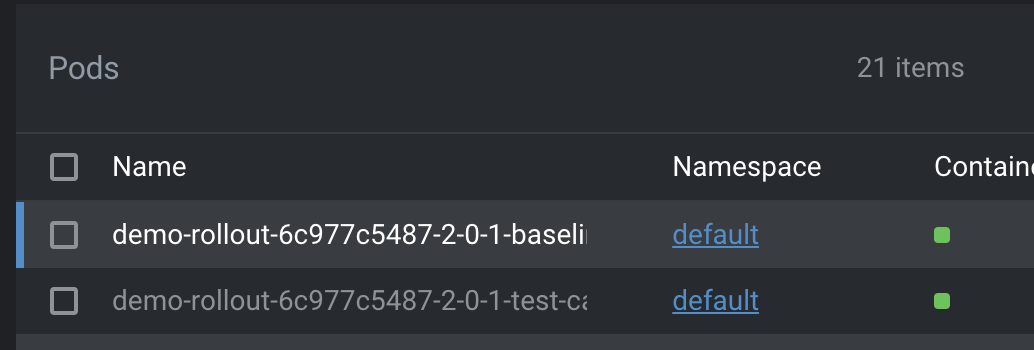
결과를 보기 위해서는 describe를 하는 것을 추천한다. 하면 테스트가 전부 실패하는 것을 볼 수 있다.
Why.
앞에서 setWeight를 통한 카나리 설정을 하지 않아 서비스 리소스가 생기지 않기 때문이다.
따라서 반드시 카나리 N% 를 할당 후 테스트를 진행해야 한다.
Comments